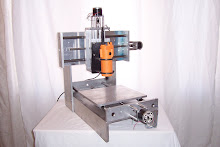
It's been a little while but I was busy filling orders and doing some more R&D work. I just completed our newest product, the Modular CNC Mini Mill. Perfect for people that want a small machine to get started in CNC programming.
I am also working on a nice programming guide that will be great for the experienced and the beginners. I've gotta get to bed.
Andy
Tuesday, October 28, 2008

Saturday, September 20, 2008
Why You Need to Learn CNC Now
When is the last time you had something quoted by one of your local CNC job shops?
Here in the Albuquerque, NM area, shop rates have risen to $60 - $100/per hour and I think that is being very conservative.
When I got my first job in manufacturing and design, shops rates and engineering rates were $40/hour in 1995.
I think we are only at the beginning of this phase. You must also remember that the baby boomers have started to retire and will continue to retire very quickly as we approach the next few years. I have worked with a lot of very talented boomer machinists. They are the ones that have taught me the most about precision set-up, speeds & feeds, and just all around common sense in the shop.
I am a generation X'er. I look around at my peers and they are not technical people. They went to school to be doctors, lawyers, teachers, accountants and high end engineers. Most of these guys/girls probably have never tapped a hole in their lives. This is what I have noticed and it is probably the norm from state to state.
Here is another factor to consider. The manufacturing industry in the USA has taken a beating, lots of jobs lost and moved out to China/Mexico. This means alot of people have lost their jobs and gone on to other careers or retirement.
Considering all of the information above I believe soon we will see the "Machine Shop Perfect Storm". This is when shop rates will rise even higher and lead times will become even longer. Good machinists will be in high demand which will drive up shops rates even higher. Now is the time to start learning CNC!!!
The best way to learn CNC machining is to stop your career/life and enroll in a 1 - 2 years long college or tech school program. Then follow that up by another 1 - 3 years as an apprentice at a shop.
Most of us are already in careers and have full time jobs. There are also alot of people that don't live close enough to a school to make this an option. What are you to do!
My suggestion is to buy or build your own cheap CNC router for learning. That will be the fastest way for someone to learn CNC programming, set-up and operation. This is not some long wind sales pitch, this has been my thinking about the industry for the past few years. The nice thing about learning this way is that you can do this on a shoestring budget and when you are done learning and are capable on not crashing on every your machine, you unbolt the motors from your starter machine and bolt them (along with the other electronics) onto your next size up or better material machine. Some peoples websites have said "Don't start with a starter or beginner machine, buy or build the right one the first time". That is a great statement but who wants to crash their really nice big machine the first time they hit the cycle start button. I would much rather plow my spindle into the top of my MDF top plate than into a large aluminum/steel plate. Learn your lessons with an affordable machine to repair and replace.
Here in the Albuquerque, NM area, shop rates have risen to $60 - $100/per hour and I think that is being very conservative.
When I got my first job in manufacturing and design, shops rates and engineering rates were $40/hour in 1995.
I think we are only at the beginning of this phase. You must also remember that the baby boomers have started to retire and will continue to retire very quickly as we approach the next few years. I have worked with a lot of very talented boomer machinists. They are the ones that have taught me the most about precision set-up, speeds & feeds, and just all around common sense in the shop.
I am a generation X'er. I look around at my peers and they are not technical people. They went to school to be doctors, lawyers, teachers, accountants and high end engineers. Most of these guys/girls probably have never tapped a hole in their lives. This is what I have noticed and it is probably the norm from state to state.
Here is another factor to consider. The manufacturing industry in the USA has taken a beating, lots of jobs lost and moved out to China/Mexico. This means alot of people have lost their jobs and gone on to other careers or retirement.
Considering all of the information above I believe soon we will see the "Machine Shop Perfect Storm". This is when shop rates will rise even higher and lead times will become even longer. Good machinists will be in high demand which will drive up shops rates even higher. Now is the time to start learning CNC!!!
The best way to learn CNC machining is to stop your career/life and enroll in a 1 - 2 years long college or tech school program. Then follow that up by another 1 - 3 years as an apprentice at a shop.
Most of us are already in careers and have full time jobs. There are also alot of people that don't live close enough to a school to make this an option. What are you to do!
My suggestion is to buy or build your own cheap CNC router for learning. That will be the fastest way for someone to learn CNC programming, set-up and operation. This is not some long wind sales pitch, this has been my thinking about the industry for the past few years. The nice thing about learning this way is that you can do this on a shoestring budget and when you are done learning and are capable on not crashing on every your machine, you unbolt the motors from your starter machine and bolt them (along with the other electronics) onto your next size up or better material machine. Some peoples websites have said "Don't start with a starter or beginner machine, buy or build the right one the first time". That is a great statement but who wants to crash their really nice big machine the first time they hit the cycle start button. I would much rather plow my spindle into the top of my MDF top plate than into a large aluminum/steel plate. Learn your lessons with an affordable machine to repair and replace.
- Modular CNC MDF X-axis top plate, $25 replacement cost (you really just need to cut a piece from you own stash of MDF and match drill the holes and you just fixed your machine)
- Modular CNC Aluminum X-axis top plate, $95 replacement costs
Once you have your starter CNC router, software, electronics box, PC, and motors, I would spend about 4 - 8 hours just playing with your machine and software. Jog it around, manually cut something, click on all of the buttons int he software. Ask your boss if you can go out to the shop and do that with one of his machines. I am sure he'll say no and want that spindle cutting instead of sitting still (standard job shops).
Next up is programming. Go out to the web and download a copy of the standard G & M codes. HaasCNC.com has a nice free download of standard G & M codes. You must live them and love them, be one with the code. I tell people that you need to be like the people from the movie "The Matrix". When they look at the computer code they see "people, places, and things". That is how you need to be, instead of seeing G & M code, x..this y...that, you need to see the machine movement and know what your machine will be doing next. This is very helpful during initial progrma set-up and tryout. Once your program and set-up is proven you can just let your machine run.
Another programming tip is to make sure you get a cool CNC software like Mach3 that includes a CAM program like Lazy CAM. This program lets you upload DXF files to it which it then converts to G & M code automatically. Here is the really slick idea, go to eBay.com and do a search for DXF files. You can buy pre-made DXF files in bundles that have common themes like western, flowers, fishing, etc, etc. You take these files, upload one, covert to code, do a quick part zeroing and cut something. Here is how I have learned alot in CNC programming. Go back to that same program without removing your cut part and run in step block mode. This means that it will run one line of code at a time when you press the start button. This lets you see what each line does. I think this is very important because it lets you become very comfortable with the code, your software , and your machine.
This isn't going to be an overnight learning process. You still need to know about quick, fast, and accurate set-ups and most importantly Feeds & Speeds. A few quick tips: start slow with your feedrates, rough spindle speeds: wood 12,000 - 20,000 rpm, plastic 4,000 - 8,000 rpm, aluminum 2,000 - 7,000 rpm, steel 200 - 2,000 rpm. Those rpms vary depending on your cutter size and # of flutes. Remember when cutting, heat is our enemy, aluminum and plastic like to melt. Nothing melts them faster than too heavy of a cut at 10,000 rpm. If you have seen my aluminum cutting videos you will notice that when I cut aluminum, my rpms were very high due to the cheap spindle I was using but it cut because I was taking a light cut. In the MDF cutting video I take a very large cut of 7/16 deep and plow right through it like butter. That is because the wood likes the higher rpms.
This is all for now. I ahve to go to sleep.
Andy
Monday, September 1, 2008
Your Custom CNC Router
Modular CNC offers a nice and affordable standard line of products but don't be afraid to ask about a custom application that will fit your needs better. We have over 12 years of experience in designing and building custom machinery for people. Email us with anything you may need.
The "Other" Modular CNC
There is another small business with the name of Modular CNC on eBay. So far that is his only selling venue.
My eBay user ID is modular-cnc
We are not related in any way. I believe I got the domain name first and before I thought about it he got the eBay user ID of modularcnc.
He sells circuit boards and other related products and is located in Canada.
www.modularcnc.com is located in New Mexico USA and sells mechanical components for CNC routers and mills.
My eBay user ID is modular-cnc
We are not related in any way. I believe I got the domain name first and before I thought about it he got the eBay user ID of modularcnc.
He sells circuit boards and other related products and is located in Canada.
www.modularcnc.com is located in New Mexico USA and sells mechanical components for CNC routers and mills.
Sunday, August 31, 2008
CNC Router Accuracy
This is a great topic because everybody wants to know how accurate of a machine that they are buying or building. Here is some helpful information to consider.
- Accuracy in any simple CNC machine boils down to one thing. The accuracy of your lead screw or ball screw. There are of course other factors but in the end this is the big one.
- There is also some softwares that allows you to "map" your ball screw so that you can adjust your machine to be more accurate. This is done by almost all CNC manufacturers out there.
- Servo driven machines are no different because they work with a rotary encoder that trusts the accuracy of the ballscrew.
- The other factors that aafect the accuracy of your machine are heat, moisture, wear, tightness of srive components, and backlash in the drive system.
- Here at Modular CNC we handle backlash using a double nut system and a little preload.
I hope this helps explain accuraccy during your machine build.
Thanks, Andy
Getting Started with CNC Routing
Here is a quick guide to getting started in CNC Routers. These are some of the main items you will need.
- Spindle: Harbor Freight 1/4" Laminate Trim Router (2.5" body diameter)
- Shaft Couplers: To couple the motors to the screw shafts look at I have them available on my website. You can also try http://www.mscdirect.com for shaft couplers. You can also find them on eBay as well.
- Electronics package: http://www.xylotex.com/ and others. The type of electronics package you get will depend on your level of electronics experience and what you want to do. I like Xylotex because you can buy a complete finished controller with motors or you can buy just the board and get the other items you need separately (motors, power supply, fan, enclosure, etc.).
- Software: You should use the software that works best with the electronics kit you choose. They will have recommendations.
- PC: You should use the type of computer that is recommended by the software. Some need an older computer that boots in DOS mode but there are others that can run on XP.
- Work Holding: This can be easily accomplished by using a "spoil board" piece or sacrifice piece. You bolt your work piece to the spoil board and then bolt the spoil board to the table top. This allows to cut through the work piece and into the spoil board without ruining the machine top plate.
- CNC Programs: You will need to generate G & M codes to operate your CNC Machine. This can be done in many ways. You can buy your programs form others on the internet, you can hand write code, you can purchase a CAM program that allows you to draw in there software and generate code from that, or draw in a separate CAD program and import it into you CAM program for CNC code generation.
There is tons of info out there on the web just Google CNC Router and Table Top CNC Router. I hope this helps.
Thanks,
Andy
Subscribe to:
Posts (Atom)